Input list template: No guesswork at line check.
Free band input list templates as editable CSVs, with the source, mic or DI, stand, phantom power and supplier for every channel. Import one into the stage plot maker to print it with the plot.
What you get
- Every connection in writing. Source, mic or DI, stand, phantom power and notes for each channel.
- Who brings what, settled. Each channel says whether the band or the house supplies it.
- Stereo pairs kept together. Pair and side columns keep left and right channels next to each other.
- Edit it in any spreadsheet. Then import it, check the preview and print it with the plot on Letter or A4.
solo-acoustic-inputs.csv · 2 rows · 10 columnsDownload
| source | performer | mic_di | stand | phantom | provided_by | notes | crowd | pair | side |
|---|---|---|---|---|---|---|---|---|---|
| Vocal | Solo performer | Dynamic | Boom | no | house | false | |||
| Acoustic guitar | Solo performer | DI | None | no | band | false |
duo-inputs.csv · 4 rows · 10 columnsDownload
| source | performer | mic_di | stand | phantom | provided_by | notes | crowd | pair | side |
|---|---|---|---|---|---|---|---|---|---|
| Vocal A | Performer A | Dynamic | Boom | no | house | false | |||
| Vocal B | Performer B | Dynamic | Boom | no | house | false | |||
| Acoustic guitar | Performer A | DI | None | no | band | false | |||
| Keys mono | Performer B | DI | None | no | band | false |
rock-band-inputs.csv · 12 rows · 10 columnsDownload
| source | performer | mic_di | stand | phantom | provided_by | notes | crowd | pair | side |
|---|---|---|---|---|---|---|---|---|---|
| Kick | Drummer | Kick mic | Short boom | no | house | false | |||
| Snare | Drummer | Dynamic | Boom | no | house | false | |||
| Hi-hat | Drummer | Condenser | Boom | yes | house | false | |||
| Rack tom | Drummer | Dynamic | Clip | no | house | false | |||
| Floor tom | Drummer | Dynamic | Clip | no | house | false | |||
| Overhead L | Drummer | Condenser | Tall boom | yes | house | false | overheads | left | |
| Overhead R | Drummer | Condenser | Tall boom | yes | house | false | overheads | right | |
| Bass DI | Bassist | DI | None | no | band | false | |||
| Guitar amp | Guitarist | Dynamic | Short boom | no | house | false | |||
| Lead guitar amp | Lead performer | Dynamic | Short boom | no | house | false | |||
| Lead vocal | Lead performer | Dynamic | Boom | no | house | false | |||
| Backing vocal | Guitarist | Dynamic | Boom | no | house | false |
keys-playback-inputs.csv · 5 rows · 10 columnsDownload
| source | performer | mic_di | stand | phantom | provided_by | notes | crowd | pair | side |
|---|---|---|---|---|---|---|---|---|---|
| Keys L | Keyboard performer | DI | None | no | band | false | keys-pair | left | |
| Keys R | Keyboard performer | DI | None | no | band | false | keys-pair | right | |
| Playback L | Keyboard performer | DI | None | no | band | false | playback-pair | left | |
| Playback R | Keyboard performer | DI | None | no | band | false | playback-pair | right | |
| Vocal | Vocalist | Dynamic | Boom | no | house | false |
wedding-band-inputs.csv · 14 rows · 10 columnsDownload
| source | performer | mic_di | stand | phantom | provided_by | notes | crowd | pair | side |
|---|---|---|---|---|---|---|---|---|---|
| Kick | Drummer | Kick mic | Short boom | no | house | false | |||
| Snare | Drummer | Dynamic | Boom | no | house | false | |||
| Rack tom | Drummer | Dynamic | Clip | no | house | false | |||
| Floor tom | Drummer | Dynamic | Clip | no | house | false | |||
| Overhead L | Drummer | Condenser | Tall boom | yes | house | false | overheads | left | |
| Overhead R | Drummer | Condenser | Tall boom | yes | house | false | overheads | right | |
| Bass DI | Bassist | DI | None | no | band | false | |||
| Guitar amp | Guitarist | Dynamic | Short boom | no | house | false | |||
| Keys L | Keyboardist | DI | None | no | band | false | keys-pair | left | |
| Keys R | Keyboardist | DI | None | no | band | false | keys-pair | right | |
| Horn | Horn player | Dynamic | Boom | no | house | false | |||
| Lead vocal | Lead vocalist | Dynamic | Boom | no | house | false | |||
| Guitar vocal | Guitarist | Dynamic | Boom | no | house | false | |||
| Keys vocal | Keyboardist | Dynamic | Boom | no | house | false |
A channel list you can edit.
Each CSV uses the editor’s source, performer, mic_di, stand, phantom, provided_by, notes, crowd, pair and side columns. Keep pair values equal across an adjacent left/right pair. Leave optional text blank when it is unknown; confirm it before the advance.
- source
- What the channel picks up
- performer
- Matched to a player on the plot
- mic_di · stand
- The connection and its stand
- phantom
- yes or no for 48V; blank when unknown
- provided_by
- band or house
- notes
- Anything the engineer needs
- crowd
- true for a crowd mic, sent to IEM mixes only
- pair · side
- The same pair value on adjacent rows, left then right
Import without losing your draft.
Open a matching starter in the stage plot maker, so performer names already exist.
Edit the CSV in your spreadsheet, then export CSV or TSV under 64 KiB.
Open Import inputs, choose append or replace, and preview the rows.
Map any unfamiliar headers and resolve performer matches.
Review channel counts and warnings before applying.
Reorder linked pairs together and confirm each performer’s channels on the diagram.
Print the matching plot and input list on Letter or A4.
Confirm microphones, stands, phantom power and monitor outputs with the house engineer.
Crowd microphones are labelled for IEM mixes only. A stereo channel pair and a stereo monitor mix describe different connections; check both.
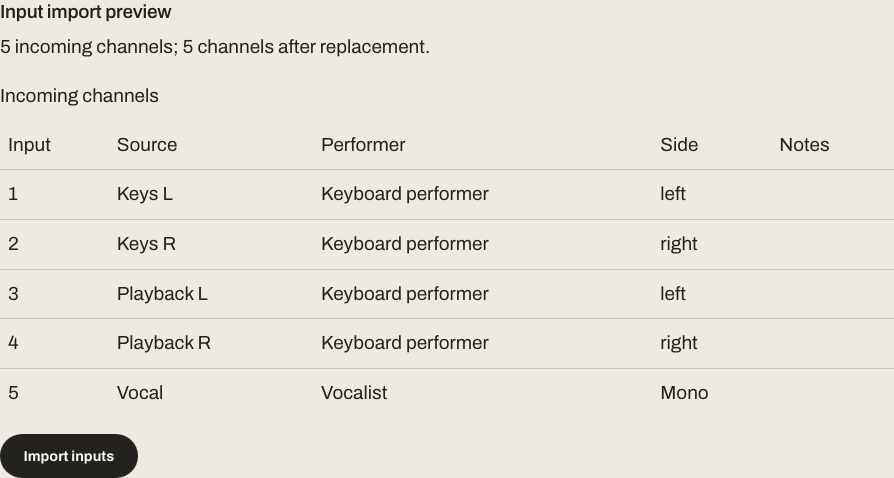
Check the preview before applying.
A successful preview shows each source, performer and stereo side. Resolve mapping errors and confirm the append or replace count before the import changes your draft.
Free drafts and the saved-show package.
Print clean stage and rehearsal documents without a subscription. Live Show Plus combines saved stage variants, repertoire, setlists, frozen show packs and venue links.
Sign in to save an editable starter plot and an editable starter show across your account. Live Show Plus adds saved variants and venue links for $5/month or $29/year, and Unlimited includes it. Mastering and paid Release manager features use their own access.
Prepare the advance.
Make the channel details agree with the stage plot example, then confirm them with the venue. See the free starters and included show tools. For the next record, hear a full mastering preview for free.